Android tablets for education
BLOG — EDUCATION · TABLETS · LAPTOPS · COHORT BUYING
Schools rarely choose between tablets and laptops; they choose the mixture. This note works through which device earns which classroom job, and how to buy both lines as one standardised programme.
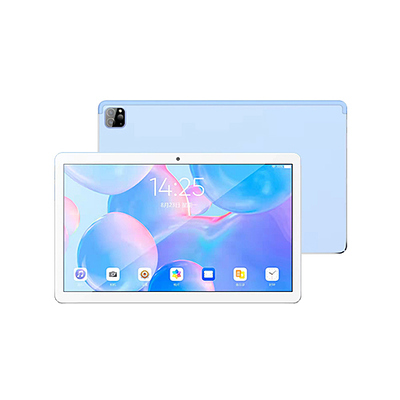
Tablets and laptops in the same classroom
The tablet-versus-laptop debate survives in education long after it ended everywhere else, because the classroom genuinely contains both jobs. Young learners, reading programmes, media capture and quick formative quizzes live naturally on a touchscreen that starts instantly and forgives small hands. Extended writing, structured coursework, spreadsheets and anything keyboard-shaped live naturally on a laptop. A programme that forces one device to do both jobs buys a compromise that every teacher in the building can describe by October.
The practical settlement most programmes reach: tablets as the shared, mobile, consumption-and-capture layer; laptops as the production layer, introduced where the curriculum starts producing documents. In this catalogue that maps cleanly onto two documented models — the 133MA-L Android tablet and the EB-i141PD1 education laptop — which is why this site treats them as one conversation rather than two product lines that happen to share a buyer.
The tablet's classroom jobs
A 13.3 inch tablet like the 133MA-L is sized for shared reading and media work: large enough for two children to read a page together, light enough to move between groups. Its published figures — the 1920 × 1080 IPS screen, octa-core processor, 8,000 mAh battery — are the ones a programme manager plans around: the screen for content legibility, the battery for the shape of the school day and the charging routine that supports it. Android's education ecosystem does the rest, provided the build is fixed in the order: name the system version your learning platform requires, because an Android 11 and an Android 12 fleet are not interchangeable for every app.
Shared-set logistics decide whether the tablet layer delights or frustrates: charging that happens in one place, cases that survive the school bag, and a spares ratio that keeps a broken unit from becoming a child's lost week. None of those appear on a specification sheet, which is precisely why they belong in the inquiry — they are configuration and accessory questions, and they are far cheaper settled before the cohort ships than improvised after.
The laptop's classroom jobs
The EB-i141PD1 represents the other layer: a 14.1 inch laptop with memory options to 16GB and storage to 1TB, bought as a cohort standard. Its classroom jobs are the production jobs — essays, projects, data work, exam-format practice — where a keyboard and a file system are the curriculum's real requirements. The reference-build concept matters more than any single figure: one configuration, held across the cohort, so that a teacher can say 'open the document from Tuesday' to thirty identical machines.
Cohort discipline extends to timing. Laptops bought in dribs and drabs become a museum of builds within two academic years; laptops bought as a named cohort, against a term's delivery date confirmed in the quotation, stay supportable for their whole school life. The series page exists to make that standardisation easy to specify.
Buying both lines as one programme
Programmes that buy the two layers separately, from separate conversations, pay for the separation twice: once in mismatched delivery schedules, and again in two accessory and spares ecosystems. Bought together, the decisions interlock productively — tablet class sets for the younger years, laptop cohorts where production begins, shared charging and storage furniture between them, one delivery plan against the school calendar. The total quantity also works harder as one inquiry than as two.
Two cautions complete the picture. First, confirm the platform questions in writing before ordering — the GMS certification check for the specific tablet model and configuration is the standing example, because tablet fleets live inside app ecosystems in a way laptops do not. Second, resist specification drift mid-programme: when a later cohort is ordered, name the original build and ask what has changed, rather than letting the fleet quietly fork. The programmes that age well are the boring ones: standard builds, written confirmations, deliveries planned against terms.
A short planning sequence
- Map devices to jobs by year group: capture and consumption down the school, production up it.
- Fix one build per device layer and record it as the programme standard.
- Settle charging, cases and spares as part of the same order, not as an afterthought.
- Confirm platform requirements — system build and services — in the inquiry, in writing.
- Plan delivery against the school calendar and confirm the schedule in the quotation.
Followed in order, that sequence turns a device purchase into a programme — which is what the classroom actually experiences, one school day at a time.
Teachers are the specification too
Programmes are usually specified by the people who buy devices and judged by the people who teach with them, and the gap between those two groups is where education technology goes to be resented. The devices in this catalogue ask little of teachers beyond the ordinary — but 'ordinary' should be verified, not assumed: put the candidate tablet and laptop in two real classrooms for a fortnight before the cohort order, and let the teachers' friction list amend the configuration. A charging point moved, a case changed, an app requirement caught — each is trivial before the order and expensive after it.
The total programme cost, honestly
Device prices are the visible minority of a programme's cost. Charging furniture, cases, spares, the staff time in setup and the replacement rhythm across the school years outweigh the headline difference between two similar models — which is why this site keeps returning the conversation to configuration and accessories in the first inquiry. A programme manager comparing two quotations should compare the whole programme each describes; where one is silent about the furniture of ownership, the silence is a cost that has merely not been invoiced yet.
Equity is a configuration question
One promise of a shared fleet is that every learner touches the same capability: the same screen, the same configuration, the same chance. That promise is kept or broken in configuration discipline — in whether the class set really is uniform, whether the loaner matches, whether the new joiner's tablet behaves like everyone else's. It is a further argument for the steady reference build and the written configuration record: equity in a device programme is not a speech, it is a settings list that somebody maintains.